• Twitter
  • Facebook
  • Google+
  • Instagram
  • Youtube

About me

Let me introduce myself


A bit about me

Duis aute irure dolor in reprehenderit in voluptate velit esse cillum dolore eu fugiat nulla pariatur. Excepteur sint occaecat cupidatat non proident.

Lorem ipsum dolor sit amet, consectetur adipisicing elit, sed do eiusmod tempor incididunt ut labore et dolore magna aliqua. Ut enim ad minim veniam, quis nostrud exercitation ullamco laboris nisi ut aliquip ex ea commodo consequat.

Profile

Fathriza Muhammad R

Personal info

Fathriza Muhammad R

Insyaallah Halal.

Birthday: 15 SEP 1999
Phone number: +(12) 34 567 89
Website: www.daitoshare.blogspot.com
E-mail: fathrizamuhammad@gmail.com

RESUME

Know more about my past


Employment

  • 2015-future

    Mutation Media @ Web Developer

    Ut enim ad minim veniam, quis nostrud exercitation ullamco laboris nisi ut aliquip ex ea commodo consequat. Duis aute irure dolor in reprehenderit in voluptate velit esse cillum dolore eu fugiat nulla pariatur. Excepteur sint occaecat cupidatat non proident, sunt in culpa qui officia deserunt mollit anim id est laborum.

  • 2011-2014

    Websoham @ Exclusive Admin

    Ut enim ad minim veniam, quis nostrud exercitation ullamco laboris nisi ut aliquip ex ea commodo consequat. Duis aute irure dolor in reprehenderit in voluptate velit esse cillum dolore eu fugiat nulla pariatur. Excepteur sint occaecat cupidatat non proident, sunt in culpa qui officia deserunt mollit anim id est laborum.

  • 2009-2011

    Templateclue.com @ Lead Developer

    Ut enim ad minim veniam, quis nostrud exercitation ullamco laboris nisi ut aliquip ex ea commodo consequat. Duis aute irure dolor in reprehenderit in voluptate velit esse cillum dolore eu fugiat nulla pariatur. Excepteur sint occaecat cupidatat non proident, sunt in culpa qui officia deserunt mollit anim id est laborum.

Education

  • 2015

    University of Engineering @Level

    Ut enim ad minim veniam, quis nostrud exercitation ullamco laboris nisi ut aliquip ex ea commodo consequat. Duis aute irure dolor in reprehenderit in voluptate velit esse cillum dolore eu fugiat nulla pariatur. Excepteur sint occaecat cupidatat non proident, sunt in culpa qui officia deserunt mollit anim id est laborum.

  • 2013-2014

    College of Awesomeness @ passed

    Ut enim ad minim veniam, quis nostrud exercitation ullamco laboris nisi ut aliquip ex ea commodo consequat. Duis aute irure dolor in reprehenderit in voluptate velit esse cillum dolore eu fugiat nulla pariatur. Excepteur sint occaecat cupidatat non proident, sunt in culpa qui officia deserunt mollit anim id est laborum.

  • 2009-2013

    College of Informatics @ graduated

    Ut enim ad minim veniam, quis nostrud exercitation ullamco laboris nisi ut aliquip ex ea commodo consequat. Duis aute irure dolor in reprehenderit in voluptate velit esse cillum dolore eu fugiat nulla pariatur. Excepteur sint occaecat cupidatat non proident, sunt in culpa qui officia deserunt mollit anim id est laborum.

Skills & Things about me

photographer
86%
html & css
Punctual
91%
illustrator
Web Developer
64%
wordpress

Portfolio

My latest projects


Tampilkan postingan dengan label Other. Tampilkan semua postingan

Minggu, 30 Desember 2012

Merekam Video game PC dengan Fraps 4.3.7


Kali ini saya akan membagikan kepada semuanya software untuk merekam video game di komputer, nama aplikasi ini adalah Fraps, fungsinya bisa capture gambar, audio dan video dalam game. Ini berguna kalau agan" pada pengen bikin walkthrough game, bisa pake ini.

lagsung aja gan ini linknya, kalau link rusak bisa comment atau kirim ke email saya atau admin lain.

 
Selamat Mencoba !! ^_^

Minggu, 04 November 2012

Sword Art Online Blogger Template


Apa kabar sobat? akhirnya selesai juga template Sword art online.Template kali ini tema'a dengan warna dasar hitam dan abu".desain'a saya buat simple dengan 2 sidebar,2 kolom footer dan style post sederhana.awalnya sedikit kesulitan cari gambar header dan footer yang bagus,trus nemu material gambar di google dan di minitokyo.com,edit sendiri,croping sendiri,ngerender sendiri =___="


template ini berasal dari template blog saya Djogzs.blogspot.com tapi dengan design berbeda. Alasan saya sharing template ini karena banyak request yang ingin template dengan model post seperti di blog saya dan juga mencegah orang berbuat nekat jiplak template saya, karena saya sendiri bingung,kenapa tiap saya ganti template, ada saja yang ngikutin warna,bentuk template bahkan sampai isi posting,widget blog sama 100%.apakah istemewanya blog saya? pdahal sama saja dengan template blogger yang lain.yang ngejiplak ituloh yang buat saya jadi males ngeblog lagi,mending berhenti aja dah,tapi karena sekarang lagi liburan saya lanjutin deh =_____="

Tapi yweslas,saya lagi ikut puasa juga,ga bisa marah atau bertindak,males ngurusin bocah ,so dimohon untuk menghilangkan kebiasan buruk menjiplak,dan juga jangan terprofokasi dengan grup" yang selalu ada masalah,karena itu saya tidak mau ikut campur urusan grup ini grup itu.

I Just wanna free~ n_n

kembali ke templatenya,pasti pada taukan anime sword art online? lagi hot nih anime~
tokoh favorite saya yang pasti kirito dan asuna *.*

yang msh penasaran,bisa lihat previewnya dibawah ini


Preview


Pengaturan menu

Buka blogger=> Template =>Edit HTML lalu cari kode HTML seperti dibawah ini :

<div class='navijohanes'>
<ul>
<li><a href='#'>Home</a></li>
<li><a href='#'>About me</a></li>
<li><a href='#'>Tutorials</a></li>
<li><a href='#'>Articles</a></li>
<li><a href='#'>Download</a></li>
<li><a href='#'>Inspiration</a></li>
</ul>
</div>

Kemudian Ganti tanda pagar '#' dengan Url link yang kamu inginkan dan ganti juga nama linknya.


Tertarik menggunakan template Sword Art online?
Check this Out~


Sumber : djogzs

Sabtu, 29 September 2012

Annoying Orange - ORANGE NYA NYA STYLE (GANGNAM STYLE Spoof)

Kamis, 21 Juni 2012

JPCSP | Java PSP Emulator For PC Update v2

 JPCSP | Java PSP Emulator For PC Update v2

Melihat masih banyaknya pengunjung yang mencari PSP emulator untuk komputer atau lapot. Dan melihat dari cacatnya artikel PSP sebelumnya karena banyak link pendukung yang sudah mati, di sini saya kembali akan berbagi PSP emulator kepada anda sekalian. PSP Emulator sendiri kurang lebih adalah software yang dapat di gunakan untuk bermain game PSP di PC kita. Untuk anda yang berniat memiliki PSP Emulator ini, sebaiknya di simak baik-baik semua step dan tutorial yang saya share pada artikel ini

Note
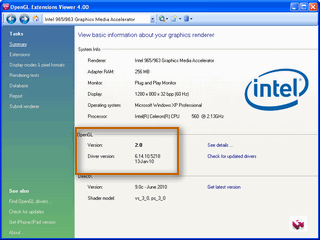
Sebelumnya cek dulu apakah VGA anda support OpenGL 2.0. PSP Emulator ini tidak akan berjalan pada PC dengan VGA yang tidak support OpenGL 2.0 dan untuk mengeceknya, download software di bawah ini:
Cara penggunaannya cukup download lalu install dan jalankan Softwarenya. Contoh VGA saya saat di chek menggunakan Software ini

Jika VGA anda sudah support OpenGL 2.0, berarti anda siap untuk persayaratan ke 2. Dan jika VGA anda belum support OpenGL 2.0. Cobalah untuk mengupdate driver VGA anda. saran saya gunakan software Driver Identifier. langsung download di artikel koskomputer sebelumnya disini

System Requirements
  • Minimum
  • Windows 32bit or 64bit
  • CPU: Core2Duo and up @ 3.00 GHz
  • GPU: Any graphic card supporting OpenGL 2.0 and up 2GB RAM
  • Recommended
  • Windows Vista / Windows 7
  • CPU: Intel Core i3/i5/i7 @ 2.5 GHz
  • GPU: Always install the latest drivers
  • 2GB RAM or more

Lihat dulu apakah PC anda sudah Masuk dalam System Requirements di atas ? jika sudah kini PC anda telah siap untuk bertempur hehe


Bahan
- JPCSP Emulator
=>> Pilih yang paling teratas, dan ambillah sesuai OS yang anda gunakan.

- JRE ( Java Runtime Environment ) for 32 Bit
- JRE ( Java Runtime Environment ) for 64 Bit
=>> Pilihlah sesuai dengan windows yang anda gunakan, Jika JRE Sudah terinstall di PC anda, untuk bahan no 2 ini anda boleh tidak mendownloadnya. Oh ya JRE ini berbeda loh dengan JDK. Jangan sampai salah yah

- SonicStage
Fungsi file ini adalah untuk untuk playback video & audio

Password ( if need ): koskomputer.blogspot.com


Installasi
1. Download semua file bahan di atas
2. Ekstrak JPCSP
3. Install JRE
4. Ekstrak dan Install SonicStage
5. Letakan File ISO game PSP anda ke dalam umdimages ( foldernya berada pada JPCSP yang anda ekstrak tadi )
6. Jalankan JPCSP anda, caranya masuk ke dalam folder ekstrakan JPCSP dan klik start-windows-x86 or start-windows-x64 ( sesuai dengan versi windows anda, filenya berupa file batch atau bat ) Setting JPCSP anda, berikut contoh setting terbaik yang bisa saya berikan
Jika masih kurang jelas, gambarnya di zoom. klik tombol scrool pada mouse anda pada image untuk membuka gambar di tab baru.
Dan ingat, setting di atas hanyalah untuk settingan pada sebagian besar game PSP agar maksimal saat di jalankan oleh Emulator. Untuk beberapa game, terkadang menuntut untuk mematikan beberapa fungsi di atas

7. Jalankan game anda dengan mengklik File >> Load UMD >> Game anda >> Run
8. Selesai.


Warning
Walaupun Emulator ini worked hampir di seluruh PC, tapi kasus yang saya dapat setelah menginstall emulator ini adalah muncul error saat PC di nyalakan. yah mungkin hanya saya atau beberapa orang saja yang mengalami ini, tetapi untuk warning saja, sebaiknya di backup dulu sebelum anda mendownload dan menjalankan Emulator ini. Jangan sampai kasusnya seperti saya :hammer bisa repot.


Info
Link: Tested by Koskomputer
Software: Tested by Koskomputer

Semoga Bermanfaat
^^

Selasa, 02 November 2010

How to get your Ninja Saga Emblem without spending bucks


Most of Ninja Saga players are non-premium users or non-emblem users. Everybody wants to have one but have little or no bucks. Today, I will share to you how did I acquire my premium account without spending a single cent.

Note: This guide teaches you how to earn  $20 in less than a month and spend it to acquire a premium account or buy in game items or tokens. This guide is no cheat and also not one of those who claimed to give you premium accounts but are only fooling you. Instead they are benefiting themselves because they are redirecting you to their websites to fill some "make money scheme" for them. So you really get nothing. 

Requirements: Do not skip this step unless you have one. Pay attention to every detail.
  • Verified Paypal Account - your earnings will be sent here.It must be verified. Verify your account by linking your credit or debit card or bank account. It only cost you at least $6. In my case I have a verified Paypal account. So I have not spend anything. Just in case you can't verify your Paypal account, it's okay. Just hire some with verified accounts to buy you Facebook credits or premium account and pay using your unverified account to their Paypal account. Register here.
After creating your Verified/Unverified Paypal Account follow these steps.

Method One - People String

1. Register at People String. It is a social network that pays. It pays you $.50 per person you refer to sign up and complete their first survey. So if you refer 40 persons and completed their first survey. You got $20! Easy huh? Referring means they have to join using your referral link. 

Note: The person you refer must complete their first survey. And oh you must also complete yours.

Easy bucks right? I actually made $137 just by inviting my friends. 

Method Two - Neobux

1. Register at Neobux. It is a paid-to-click website. It pays you to click ads on their website. Well, you can't complete the $20 alone. So you have to refer again people to join. Referring means they have to join using your referral link. If you can't reach $20 it's okay. The payout is $2. You can ask for a payout if you reach the threshold. The goal is to have $20 in your Paypal account. Whether accumulated earnings or single payout.I refer Neobux because it is the most trusted PTC ever created. My friends are earning here $1000 monthly. You can even search Google for payment proofs. 

Method Three - CMFads - For bloggers

Do you have a small blog or group of blogs? then join CMF ads. An advertising network for small blogs. Here is what you will do.

1. Register at CMFads. (Referral link remove due to some issues) Visit their website at www.cmfads.com
2. Click all available spikes. (you can see how many spikes available)
3. Accept all advertisements. Whether network or campaign ads.

Please read their TOS and rules. And don't be spammy. You will get banned for doing it. Register only one email address even for multiple blogs. 

In a month I earn $7 doing nothing. So I have $13 more to go to buy a premium account. 

Note: Our goal is to earn $20+ in our Paypal account not on the websites I told you. Just as long as you reach the payment threshold you can ask for a payment and it will be sent to your Paypal account.

Services

What can I do


Branding

Lorem ipsum dolor sit amet, consectetur adipisicing elit, sed do eiusmod tempor incididunt ut labore et dolore magna aliqua.

Web Design

Quis nostrud exercitation ullamco laboris nisi ut aliquip ex ea commodo consequat. Donec sit amet venenatis ligula. Aenean sed augue scelerisque.

Graphic Design

Duis aute irure dolor in reprehenderit in voluptate velit esse cillum dolore eu fugiat nulla pariatur. Excepteur sint occaecat cupidatat non proident.

Development

Duis aute irure dolor in reprehenderit in voluptate velit esse cillum dolore eu fugiat nulla pariatur. Excepteur sint occaecat cupidatat non proident.

Photography

Lorem ipsum dolor sit amet, consectetur adipisicing elit, sed do eiusmod. Donec sit amet venenatis ligula. Aenean sed augue scelerisque, dapibus risus sit amet.

User Experience

Quis nostrud exercitation ullamco laboris nisi ut aliquip ex ea commodo consequat. Donec sit amet venenatis ligula. Aenean sed augue scelerisque, dapibus risus sit amet.

Contact

Get in touch with me


Adress/Street

12 Street West Victoria 1234 Australia

Phone number

+(12) 3456 789

Website

www.johnsmith.com